
Where is the “Documents” page in the web version?
What is it
The “Documents” section allows you to store, organize, and sign all important employee documents in the system. It is used to upload employment contracts, agreements, applications, and other files required for HR record management.
How to add a document
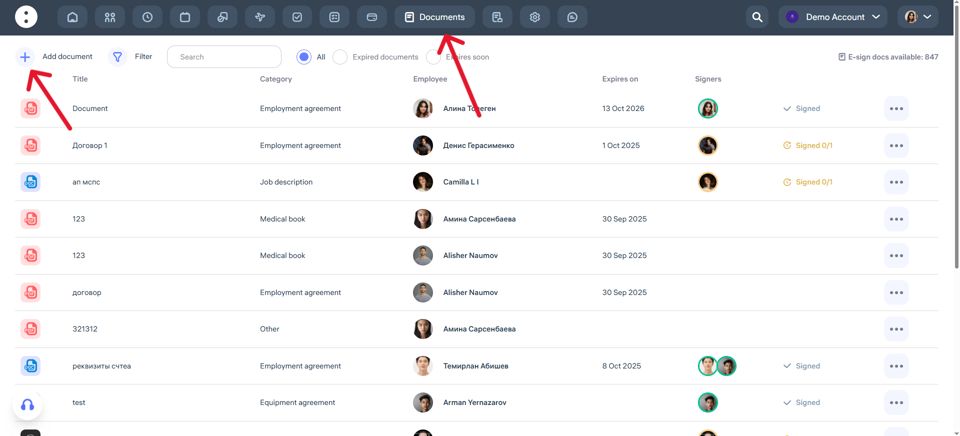
Go to the Documents section in the top menu.
Click Add Document.
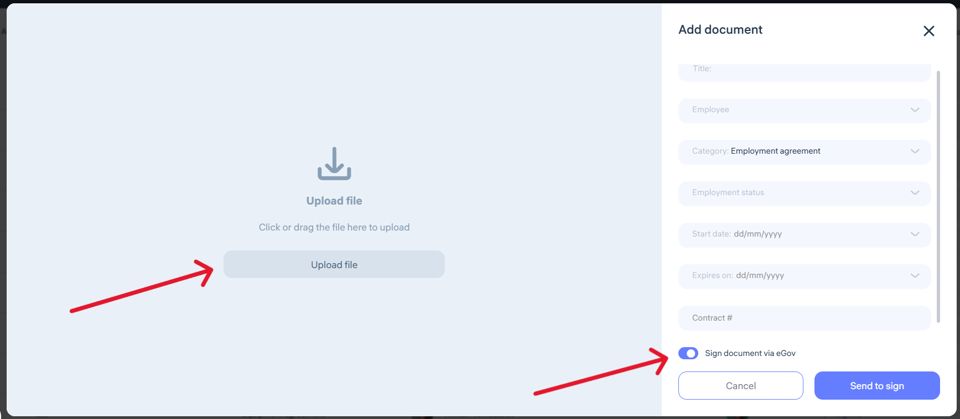
Fill in the required fields:
Document name
Employee
Category
Employment status
Document start date
End date (if applicable)
Document number (if applicable)
Upload the necessary file.
If needed, enable the eGov signing option.
Click Send to sign or Save.
Supported formats:
You can upload files in the following formats:
PDF
DOC
JPG / JPEG
PNG
XLSX
Important: Not all mobile devices support opening Excel (XLSX) and Word (DOC) files.
Updated at