clockster logo clockster
FeaturesFAQBlogAbout us
EN English
EnglishРусскийIndonesiaҚазақAzərbaycanO'zbek
Sign In
  • Download App
  • Request a demo
  • Sign In
  • Attendance tracking
  • Shift management
  • Simplified communication
  • Tasks
  • Audit and checklists
  • Payroll
  • Employee database
  • Reports and analytics
  • About us
  • Blog
  • FAQ
  • 2026 Clockster LTD
Help Center
For administratorsFor employees
  • Announcements
  • Attendance
  • Birthdays
  • Documents
  • Employees
  • Financial requests
  • General requests
  • Home
  • Leaves
  • Payroll
  • Schedules
  • Statistics
  • Tasks
Help Center For Employees Attendance

How can an employee check worked hours?

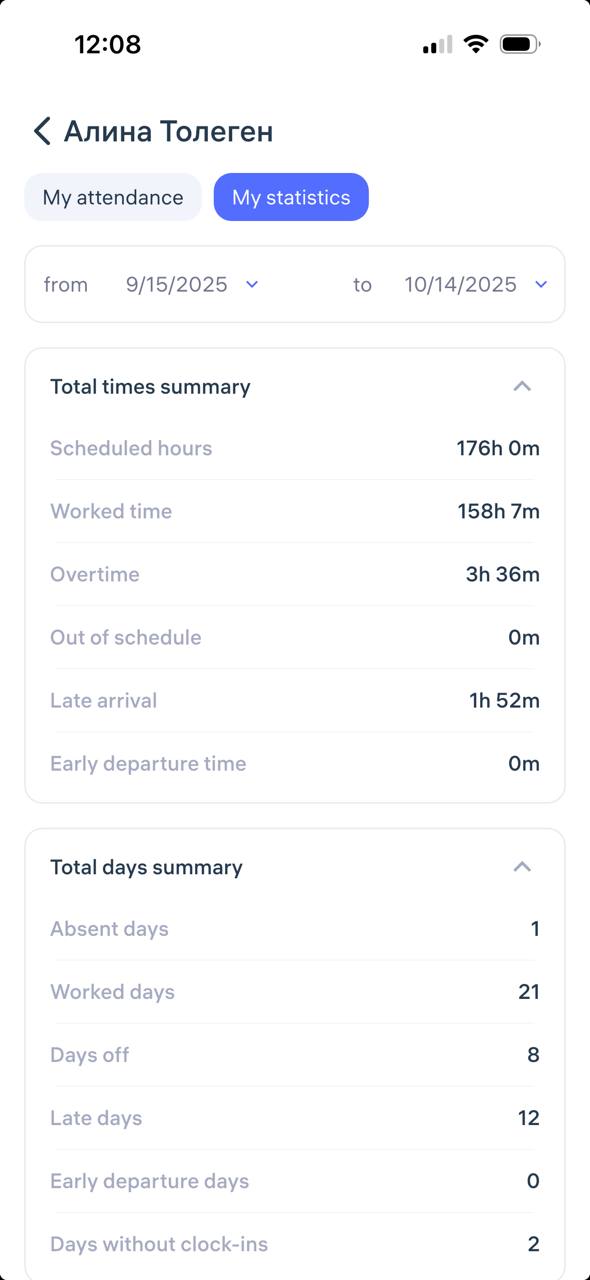
An employee can open the Clockster mobile app and go to the “Attendance” → “My Statistics” tab.

In the “My Statistics” section, they can view:

  • Total times summary

  • Total days summary

  • Average summary

  • Total leave summary

Updated at Oct 14, 2025

Related questions

  • How to view your check-ins in the Clockster mobile app
clockster logo clockster

Organize, automate, streamline. All and more in one platform

Apple store Play store App Gallery
Astana Hub
Member of the CF International technopark of IT-startups 'Astana Hub' since 24.06.2019 №54
Company
  • About us
  • Blog
  • FAQ
  • Request a demo
Contact
  • info@clockster.com
  • Youtube
  • Facebook
  • LinkedIn
  • Instagram
kominfo
© 2018-2026, Clockster PTE LTD
  • Terms & Conditions
  • Privacy Policy
kominfo

We use cookies and recommendation technologies. This is to make the site work better. By staying with us, you agree to the use of cookies. And you can also read what recommendation technologies are.