
How can I view the schedules of only the departments or positions I need?
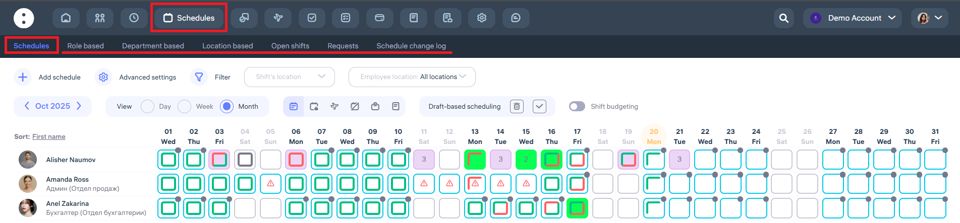
Where to view schedules
To view schedules, go to the “Schedules” section in the top menu of the Clockster system.How to switch between categories
At the top of the page, you’ll find the following tabs:By positions – shows schedules by selected employee positions.
By departments – shows schedules only for selected departments.
By locations – shows schedules of employees working at specific locations or branches.
Why this is useful
To quickly find employees and their shifts by the desired category.
To control planned shifts across departments, positions, or locations.
To simplify shift planning in large companies.
Important to remember
If you want to view schedules for only one category (for example, by location), make sure the correct tab is selected at the top of the screen. This way, the system will show only the information you need.How to filter
You can use the “Filter” button to narrow down the list by a specific location, position, or department and work only with the necessary data.
Updated at
Related questions
- What types of schedules are there?
- How to create a schedule 5/2 or 6/1? / Schedule – Days of the week.
- How to create a schedule 2/2 or 14/14? / Schedule – shift schedule.
- How do I create a day off/holiday/sick day schedule? / Leave schedule
- How do I create a schedule without a specific time period? / Free schedule