
What is a Payroll schedule and how to use it?
The payroll schedule is a feature that automates the process of calculating and generating payroll reports by setting specific dates and calculation rules.
Why use a payroll schedule?
The payroll schedule helps to:
Automatically run salary calculations according to a chosen schedule.
Avoid missed or delayed payments.
Keep payroll periods consistent.
Simplify the work of accountants and HR staff.
Synchronize payroll with all adjustments, such as bonuses, deductions, taxes, rates, and overtime.
How to use it:
Go to the Payroll section.
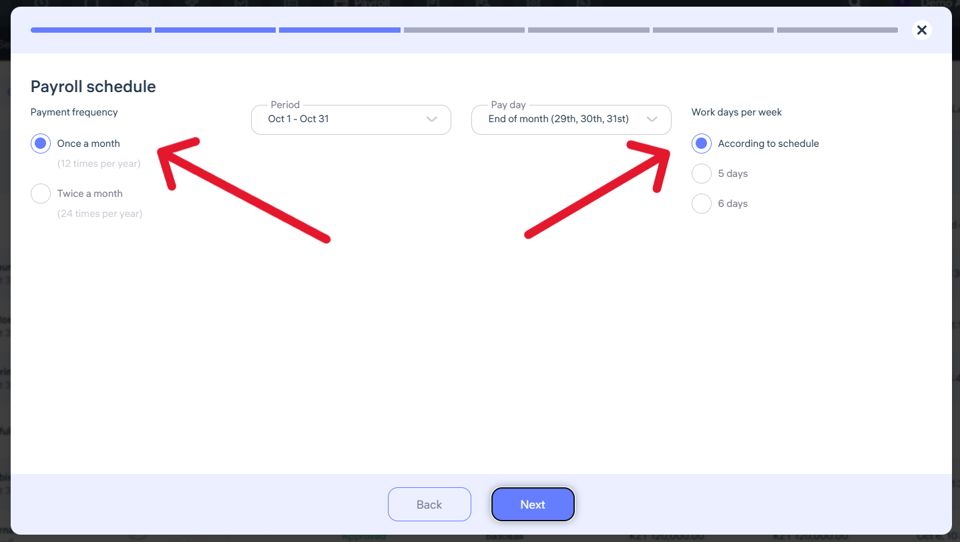
When adding a salary for an employee, set the payment frequency as the second step.
Choose one of the options:
Once a month
Twice a month
Save your settings.
The system will now automatically calculate salaries on the selected dates.
Important notes
If you select a 5-day or 6-day work week, Clockster will:
Automatically calculate the standard number of working hours based on the chosen schedule.
Include the actual worked hours from employees’ clock-in/clock-out records.
If you select “According to schedule”, the calculation is based on the employee’s individual work schedule, which defines working and non-working days.
Make sure all data such as bonuses, deductions, rates, and public holidays are filled in beforehand. Changes made later will not automatically apply to already created payroll calculations.
Automatic payroll calculation always considers actual worked time plus adjustments. Ensure that all employee clock-ins and clock-outs are recorded correctly — missing entries will result in deductions.
Each employee can have a different payroll schedule based on company policy or contract terms.
Updated at