
What is located on the Home page?
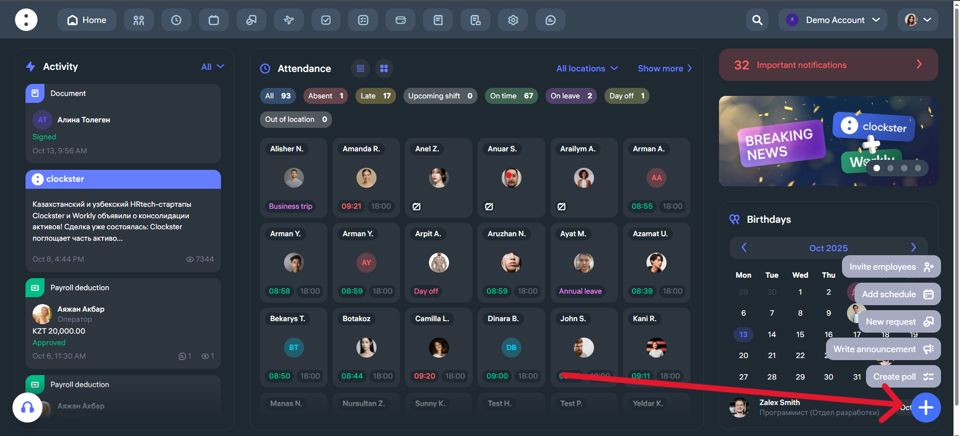
On the main page of Clockster, you can immediately get an overview of the most important company updates. Here’s what you’ll see:
What’s Displayed on the Main Page of Clockster
Events and Announcements (left side)
A full feed of key company news: webinar announcements, system notifications, and internal updates.
You can filter by categories such as Announcements, Requests, What’s New?, and Polls for easier navigation.
Employee Attendance (center)
A list of employees with their current statuses: On time, Late, Absent, On leave, etc.
You can also see each employee’s schedule for the day and the exact time they clocked in.
Filters and Toggles (top and right)
Filters by location.
The “Show more” button leads to a full analytics page, where you can filter employees by department, position, or other categories.
“Important Notifications” Block (top right)
This section shows critical events that need attention.
For example: unsynchronized or unlinked facial recognition devices at specific locations.
Upcoming Employee Birthdays (bottom right)
A convenient reminder so you never forget to congratulate your colleagues.
Quick Actions (bottom right corner, “+” button)
Add schedule
Invite an employees
Create poll
New request
Write announcement
This page is your team control center — everything important is visible at a glance.
Updated at
Related questions
- The app is properly installed, I am inside my account. How do I make clock-ins/outs?
- What’s an additional record and how to use it?
- What do I need for the mobile app to work properly? / Geolocation is not working correctly.
- Where can I get the “Invitation code”?
- Notification: “Account does not exist or the password is incorrect”.